Atomic Clock Wallpaper1.3.22
Publisher Description
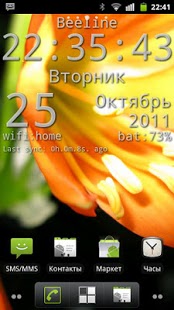
Clock Sync! No need to root! Atomic Clock Wallpaper will show you the correct time, synchronized with internet ntp time servers, on your screen without having to do so called clock sync on rooted device, it does not require to root your phone.
There are no complicated settings, just built-in time synchronization. It is very user-friendly.
Analog clock widget and fullscreen mode are also available.
Requirements:
-- internet access
-- live wallpapers enabled device
Features:
-- show correct time, like if there is a "clock sync"
- synchronize time with ntp servers
- you can select custom ntp server name
- you can select synchronization interval
- 12/24h time format support
- text or analog clock mode
- select font and color of text
- choose your own background from gallery on your SD-CARD
- play background slideshow
- show or hide ISO week number
- show or hide operator, wlan SSID, battery
- "world clock" feature is available - set custom timezone offset
Why use Atomic Clock Wallpaper?
There is a significant time shift in device clock. And it is random.
And there is an ability to synchronize time with operator network but usually that method does not work, because
operator network has incorrect time or unstable, or even does not have this feature.
So, clock must be synchronized with a different source, but there is no way to do it on unrooted device. There are some applications to do a clock sync, but all of when can do it if your device is rooted.
But Atomic Clock Wallpaper can show you a correct time.
Is root required?
No root required. You will see the correct time, only internet connection is required.
There is a demo version available, so you can try features of this application for free and decide if you want to purchase.
IMPORTANT!!! :
It is a live wallpaper, so it should be set up by going to menu (touch screen for long time), when select "Wallpaper", when select "Live Wallpapers", when find "Atomic Clock Wallpaper" and select it, when touch "Set wallpaper".
About Atomic Clock Wallpaper
The company that develops Atomic Clock Wallpaper is makarovsoftware. The latest version released by its developer is 1.3.22. This app was rated by 1 users of our site and has an average rating of 5.0.
To install Atomic Clock Wallpaper on your Android device, just click the green Continue To App button above to start the installation process. The app is listed on our website since 2013-09-23 and was downloaded 36 times. We have already checked if the download link is safe, however for your own protection we recommend that you scan the downloaded app with your antivirus. Your antivirus may detect the Atomic Clock Wallpaper as malware as malware if the download link to com.makarovsoftware.atomicclockwallpaper is broken.
How to install Atomic Clock Wallpaper on your Android device:
- Click on the Continue To App button on our website. This will redirect you to Google Play.
- Once the Atomic Clock Wallpaper is shown in the Google Play listing of your Android device, you can start its download and installation. Tap on the Install button located below the search bar and to the right of the app icon.
- A pop-up window with the permissions required by Atomic Clock Wallpaper will be shown. Click on Accept to continue the process.
- Atomic Clock Wallpaper will be downloaded onto your device, displaying a progress. Once the download completes, the installation will start and you'll get a notification after the installation is finished.
Program Details
System requirements
Download information
Pricing
Version History
version 1.3.22
posted on 2013-09-23
small bug fixes and minor improvements
version 1.3.20
posted on 2013-04-28
Several fixes and updates
